

Start Here
The Ordergroove API lets you read and manage subscription data for your merchants’ eCommerce stores. It’s used by developers integrating Ordergroove into new platforms, extending existing integrations, and building custom subscription management workflows. The API uses a REST/RPC architecture with resource-oriented URLs, standard HTTP verbs, and JSON for both requests and responses.
If this is your first time working with the Ordergroove API, the pages in this section will walk you through everything you need to get up and running.
What You’ll Need
Before making your first API call, make sure you have the following:
- An Ordergroove merchant account — Contact your Ordergroove CSM if you don’t have one yet.
- An API key — Your API key is available in RC3. See Authentication for details on how to use it.
- A REST client — You can use any tool that makes HTTP requests, such as curl or Postman.
Authentication
The Ordergroove API supports two authentication scopes depending on where your requests originate:
- Application API Scope — For server-to-server requests. Pass your API key in the
x-api-keyrequest header. Never expose this key on the client side. - Storefront API Scope — For client-side requests made within the context of a single customer. Rather than passing the key directly, you generate a signed token using HMAC-SHA256.
All requests must be made over HTTPS. Calls made over plain HTTP or without authentication will fail.
For full details, code examples, and instructions on retrieving your keys, see Authentication.
Never expose your x-api-key in client-side code (JavaScript/HTML). It is a master key for your merchant account. For browser-based requests, always use the Storefront Auth Token.
Your First API Call
The fastest way to verify your integration is to pull a list of customers from your staging environment. This confirms your API key and Merchant ID are working correctly.
1. Copy the Command
Replace <YOUR_API_KEY> with your API key from RC3.
2. Understand the Response
If successful, you’ll receive a 200 OK response with a JSON body similar to this:
3. Troubleshooting
- 401 Unauthorized: Your
x-api-keyis missing or incorrect. - 403 Forbidden: You may be using a Production key against a Staging URL (or vice versa).
- Empty Results? If you haven’t created any customers yet, the
resultsarray will be empty[]. This still counts as a successful connection!
Base URL
API requests use different base URLs depending on the endpoint and environment:
- Production:
https://restapi.ordergroove.com - Staging:
https://staging.restapi.ordergroove.com
Unless otherwise specified in the documentation, all endpoints use the restapi subdomain. Note that these APIs are rate limited — see the Rate Limits page for details.
Data Structure
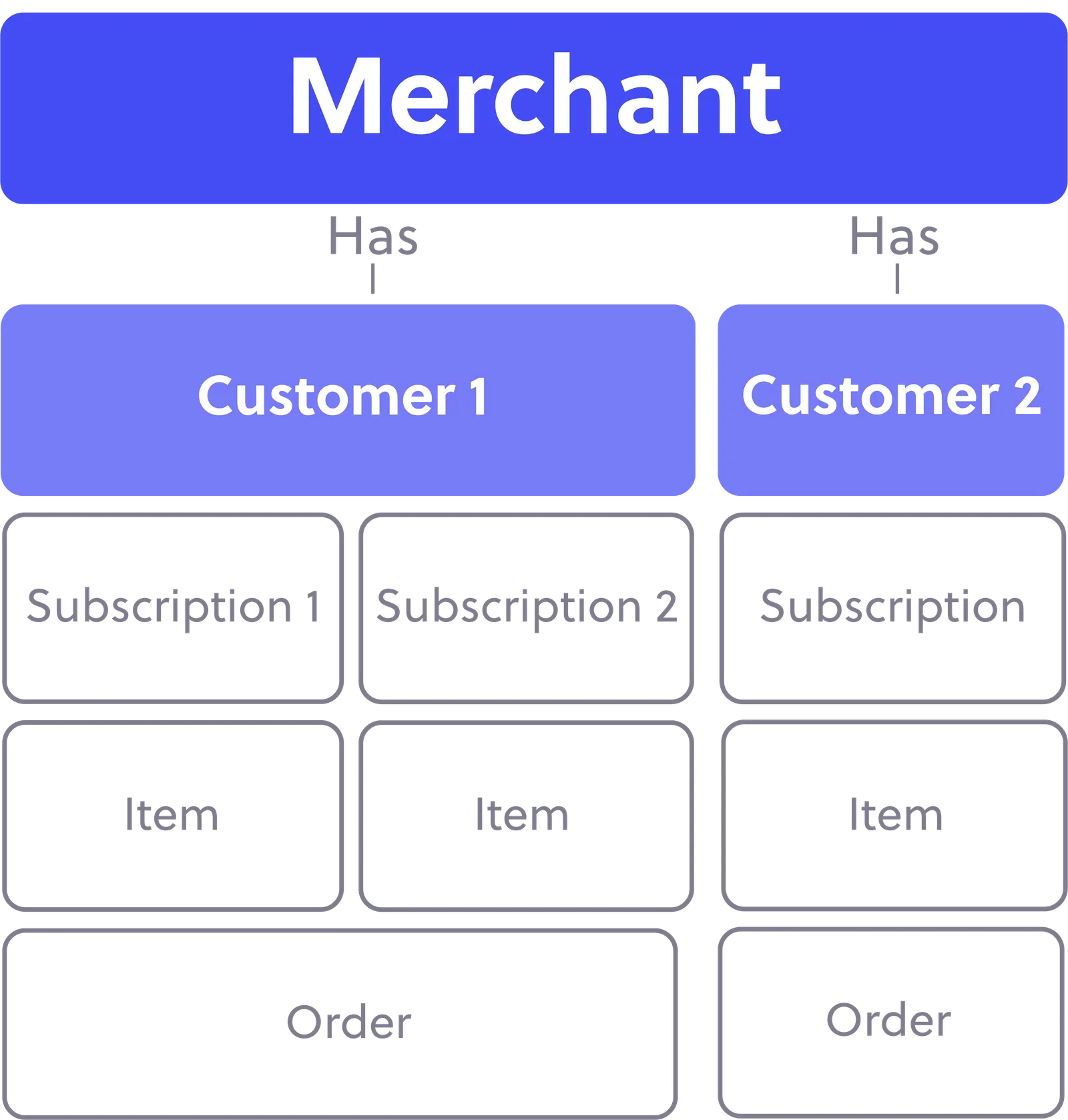
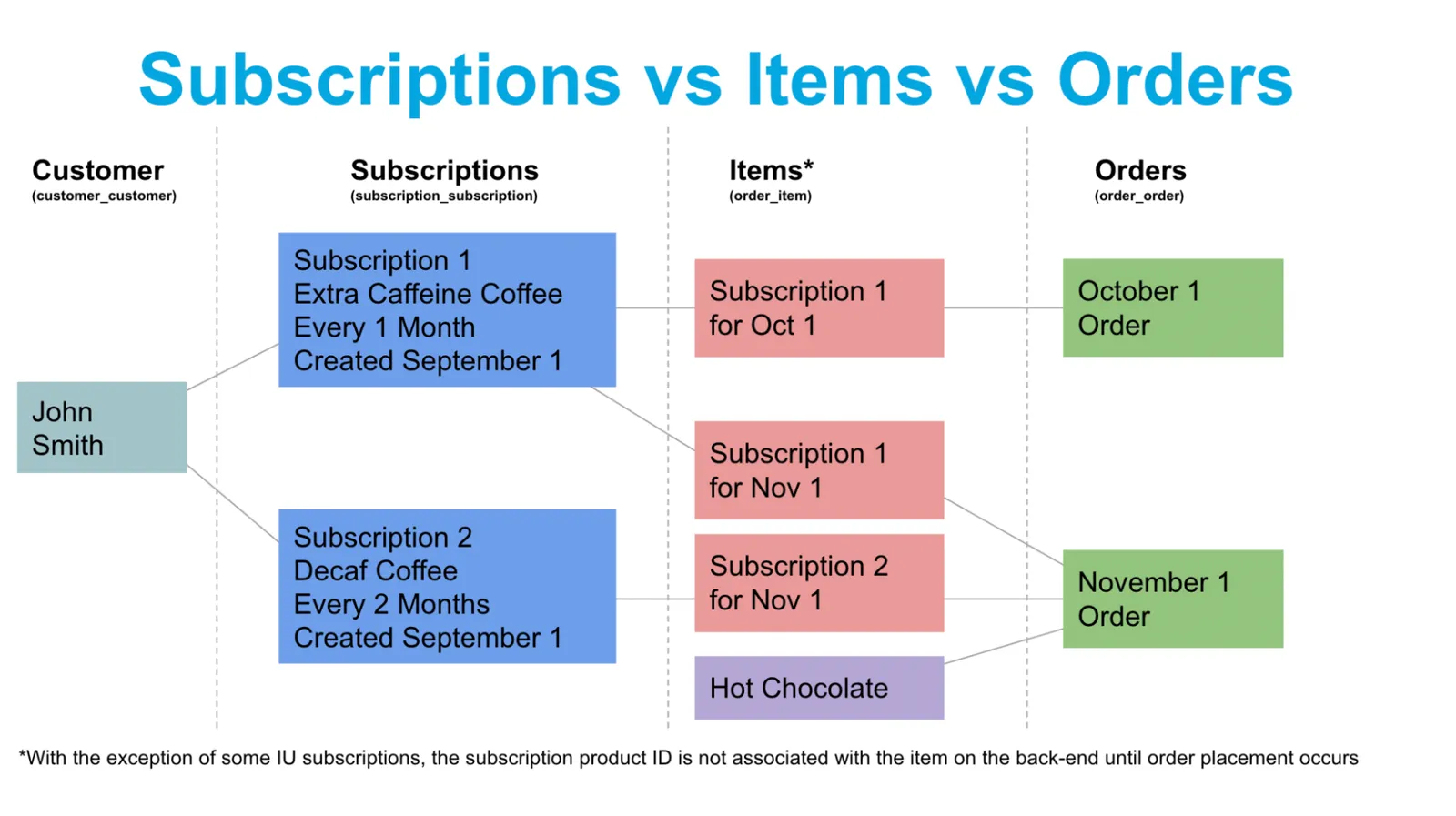
Subscriptions in Ordergroove are tied to items, not orders:
Core Data Objects
Our data model centers on four core objects: Customer, Subscription, Item, and Order. This diagram illustrates how subscriptions generate items and orders over time. Note that Ordergroove only creates the next upcoming order — subsequent orders are created as necessary.
For complete details, see Data Model at a Glance.
Response Codes
The Ordergroove API returns JSON responses. All responses include standard HTTP status codes. Codes in the 2xx range indicate success, codes in the 4xx range indicate client errors, and codes in the 5xx range indicate server errors.
Additional URLs
Subscription Creation URL
Some endpoints for subscription creation use alternate base URLs:
- Production:
https://sc.ordergroove.com - Staging:
https://staging.sc.ordergroove.com
Legacy URL
If you’re currently using the legacy API at https://api.ordergroove.com, please note that these URLs are not interchangeable with the current API. We recommend upgrading your integration to use the endpoints documented here.