

Bundle API Components
API endpoints for viewing and managing multi-product bundle subscriptions, components, and items
Ordergroove has APIs to manage multi-product subscriptions. Here is a high-level diagram of the different entities involved and how they relate to one another:
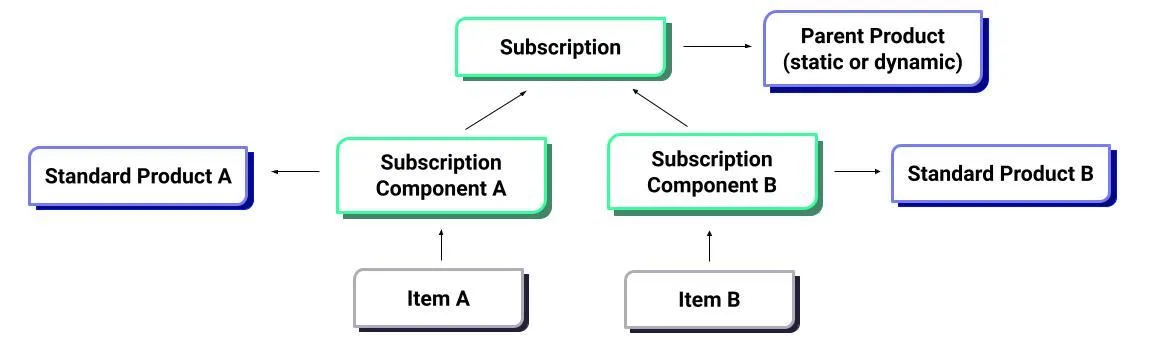
The Order entity represents a shipment the customer will receive or has received. Each Item associated with that order encapsulates a single product and its associated quantity within the shipment.
If you offer box subscriptions, many items within a single order will be associated with a single Subscription. Further, each subscription will have an associated set of Components. Each component encapsulates a specific product and quantity the customer has subscribed to in their box subscription.
While each item in the box will be associated with a single subscription, each item will also be associated with a distinct component. You can think of components as line items at the subscription level, while items are the line items at the order level.
Overview
The endpoint changes listed in this doc refer to the new Bundles Suite. If you use Legacy Bundles, take a look at Build Your Own Box Subscriptions.
Bundle subscriptions, items, and components can be viewed or changed via the following endpoints.
Updating Bundle Endpoints
- Subscription components update endpoint — can manage all components in a subscription bundle. You can create, update, and delete bundle components.
Getting Bundle Information Endpoints
- Component endpoint — returns all information of a bundle subscription component (
public_id,quantity, andproduct). - Subscription endpoints — return a
componentsfield containing all components linked to that subscription. The components structure differs between the legacy and new Bundles integrations. - Item endpoints — return the
subscription_componentID of the component that controls the item.