

Box Subscription Creation on Shopify
Learn how to configure Ordergroove to create bundled subscriptions for multiple line items in a Shopify checkout, including bundle creation, quantity overrides, and product swapping.
By default, Ordergroove will create a separate subscription for each line item in a Shopify checkout that has been associated with a selling plan.
If you would like Ordergroove to bundle multiple line items in a checkout into a single bundled subscription, you can include a property at the line-item level that we will use to determine which line items are meant to be grouped together.
The property you need to provide at the line-item level is:
__og_parent_product_id: the variant ID of the “parent product” you would like the line items to be bundled beneath.
Requirements
- The parent product does not need to be present in the cart as a line item itself, but it must be a real product variant that exists in your Shopify store. The subscription that is created in Ordergroove will reference this parent product at the top level of the subscription for tracking and data-integrity purposes.
- You must still add the required selling plan ID to each line item you want included in the bundle.
- There should only be a single line item in the cart for a given product variant that references a given
__og_parent_product_id. You should not create carts that have multiple line items for the same product referencing the same__og_parent_product_id. For example, the following cart structure would not be permitted:
This should instead be represented as:
Here is an example of what the input for this attribute would look like on a product form that is adding products to the customer’s cart:
![Browser DevTools showing the HTML of a storefront product form that posts to /cart/add. Among its hidden inputs, which include form_type, utf8, id, and selling_plan, the input named properties[__og_parent_product_id], with a variant ID as its value, is outlined.](/_fern-files/_img/50ad46efd5650e5100377b8e21bf08f980535ab2d21884bc0b6a08d67d7ffebe.webp)
You can also consult Shopify’s cart reference documentation for information on how this property can be added via API.
Each line item that has __og_parent_product_id set to the same variant ID will be bundled into a single subscription in Ordergroove’s system after the customer checks out. For example, take a look at this Shopify order:
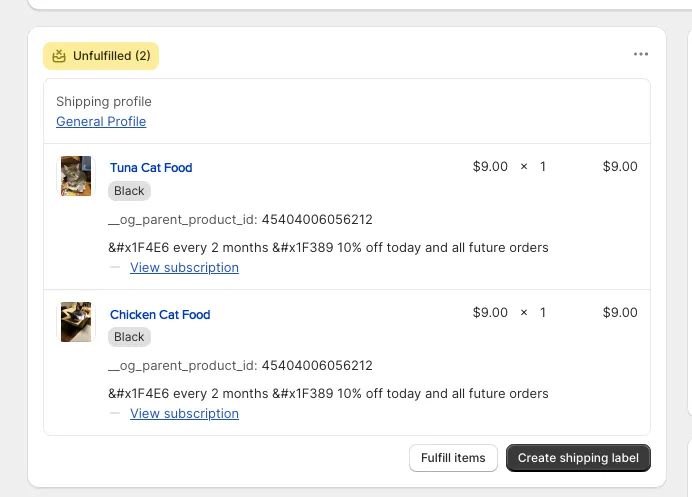
Notice both the Tuna Cat Food and Chicken Cat Food products have __og_parent_product_id set to the same variant ID. This will cause Ordergroove to create a single subscription that encapsulates both products, and the product set on the subscription itself will be the product variant specified by the __og_parent_product_id attribute.
Alternatively, if you would like to create multiple different bundles during the same checkout experience, you should assign to the __og_parent_product_id attribute the ID of the parent product concatenated with the separator symbol : and a unique key that must be the same for all the products that are supposed to be under the same bundle.
For example, with a parent product of ID 1 and four products with IDs 2–5, where you want 2 different bundles — {2, 3} and {4, 5} — both using the same parent product, configure the following:
{2, 3}:__og_parent_product_id = '1:bundle_1'{4, 5}:__og_parent_product_id = '1:bundle_2'
Overriding Item Quantity
By default, when we create a bundle subscription, the quantity of items in the cart for a bundle item will match the bundle subscription item created in Ordergroove. You can override the quantity of bundle items that will be created for the subscription by sending __og_subscription_bundle_item_quantity on the properties of the item.
Here is an example of what the input for this property would look like on a product form that is adding products to the customer’s cart:
Checking out with an item of quantity 3 but 10 as the overridden quantity in the property will create a bundle subscription in Ordergroove that will ship 10 items instead of the 3 initial ones sent on the checkout order.
Cart Checkout Examples
Single Bundle
Checking out with these items and line item properties on Shopify:
Will create this bundle in Ordergroove:
Multiple Bundles
Checking out with these items and line item properties on Shopify:
Will create these two bundles in Ordergroove:
Bundle 1
Bundle 2
Quantity Override Example
When __og_subscription_bundle_item_quantity is set alongside __og_parent_product_id, the subscription item quantity is overridden for future orders while the checkout order quantity remains unchanged:
Product Subscription Swap
The Component Product Swap allows a customer to check out with one product but subscribe to another. To do so, set both __og_parent_product_id and __og_subscription_bundle_item_product_swap on the line item. The __og_subscription_bundle_item_product_swap value should be the product ID of the product you would like to use for the subscription. You cannot swap to a bundle type product.
Adding Additional Bundle Items
The __og_subscription_bundle_item_additions attribute allows a customer to check out with one product but subscribe to multiple products. Set both __og_parent_product_id and __og_subscription_bundle_item_additions on the line item. The __og_subscription_bundle_item_additions value should be a stringified JSON blob consisting of an array of objects, each containing a product ID and a quantity. Note that additional products cannot be a bundle type.
Input format:
__og_parent_product_id: Set this to the Parent Product ID.__og_subscription_bundle_item_additions: A stringified JSON blob where each object represents a new product to add to the subscription bundle, with its quantity:{"product": "<product_id>", "quantity": <quantity>}.
Using Multiple Attributes
Attributes can be combined for increased customization: