Expiring or Termed Subscriptions Using Webhooks
Ordergroove supports termed subscriptions using webhooks — subscriptions with a set time frame that will automatically expire when they run their course. These are commonly used for gifts.
For general information take a look at the Knowledge Center. In this guide we’ll go through how to set it up.
Example Design Using Subscription Extra Data
You’ll want to set up a listener endpoint for Ordergroove’s subscription creation webhook.
If you use Shopify as your eCommerce platform, you will already see webhooks created for Ordergroove’s communication with Shopify. Please create new webhooks — do not update or disrupt those existing webhook settings.
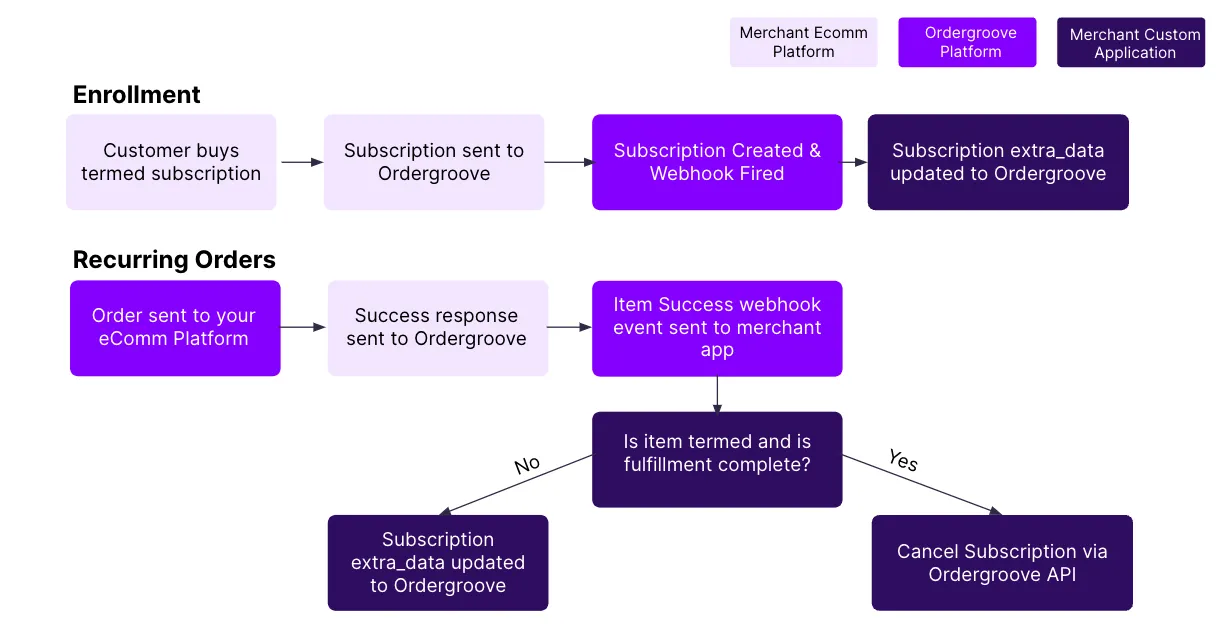
When the subscription webhook triggers and contains a termed SKU, you’ll want to call the Subscription Update endpoint and pass in extra_data information that will set the fulfillment counter (you can choose any key/value pair for this, but for this documentation we’ll use "fulfillment_counter" and a string as the number "2").
For example, this is what you could send in the body of the PATCH to update:
By including the termed: true setting, there will be an identifier returned to the front end to assist you with visuals in the Subscription Manager via the Ordergroove Advanced Editor.
When a recurring order is placed successfully for a gift, you will call Ordergroove’s REST endpoint to update the fulfillment_counter again.
- For any eCommerce environment, Ordergroove can send a webhook notification when an order is successful.
- For Shopify merchants, Ordergroove can set subscription ID, counter, and original order ID as line item properties on the order.
Updating subscription extra_data will overwrite the existing values of everything in that field, so be sure to copy and update all information before patching back to the endpoint.
When a customer has reached their last order, you will make a call to update subscription extra data with an addition of "hide": true so that you can hide this from reactivation, and then you will also call the cancel subscription endpoint to cancel.
Potential or Example Data Flow