

Configuring PayPal
Purchase POST
To use PayPal as a payment method with a custom offers integration you will need to include a payment_method field nested under the payment object of the Purchase POST and add paypal as a string. Do not include label in the payment object. Note that you can also remove card_type (or leave blank) from the request when creating with PayPal since that information is not shared.
Confirm with a solutions team member that subscription creation validation for expiration date and card type has been turned off prior to testing.
Destination:
- Staging:
https://staging.sc.ordergroove.com/subscription/create - Production:
https://sc.ordergroove.com/subscription/create
Payment Object Example
For more information on integrating subscriptions with PayPal and the required Token ID, refer to PayPal developer documentation and support.
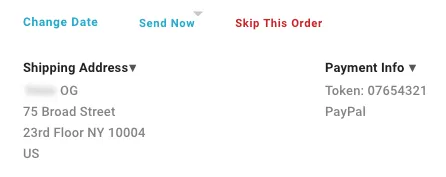
Once a subscription has successfully been created with PayPal as the payment method, this will be reflected in Ordergroove at the customer and order level:
Payment Update API
You can also update an existing subscriber’s default payment method to PayPal. To do this you will call Ordergroove’s Payment Update API when a user updates their default payment method in the Subscription Manager. Do not include label or payment_method in the payment object. Note that you can also remove card_type (or leave blank) from the request when creating with PayPal since that information is not shared.
The updated default payment information will apply to all subscriptions and upcoming orders.
The below lines will be added in addition to the current Payment Update JSON body for your integration, nested under payments.
Destination:
- Staging:
https://staging.v2.ordergroove.com/customer/update_payment_default - Production:
https://api.ordergroove.com/customer/update_payment_default