

Removing Ordergroove Code from Your Shopify Theme
General guidelines for removing Ordergroove assets and code snippets from your Shopify theme
These are general guidelines and may vary depending on your theme and any further customizations you’ve made.
Removing Ordergroove’s Code
-
Open the code editor for the theme you’d like to remove Ordergroove from.
-
In the search box, type
ordergrooveand delete all files that start with “ordergroove”.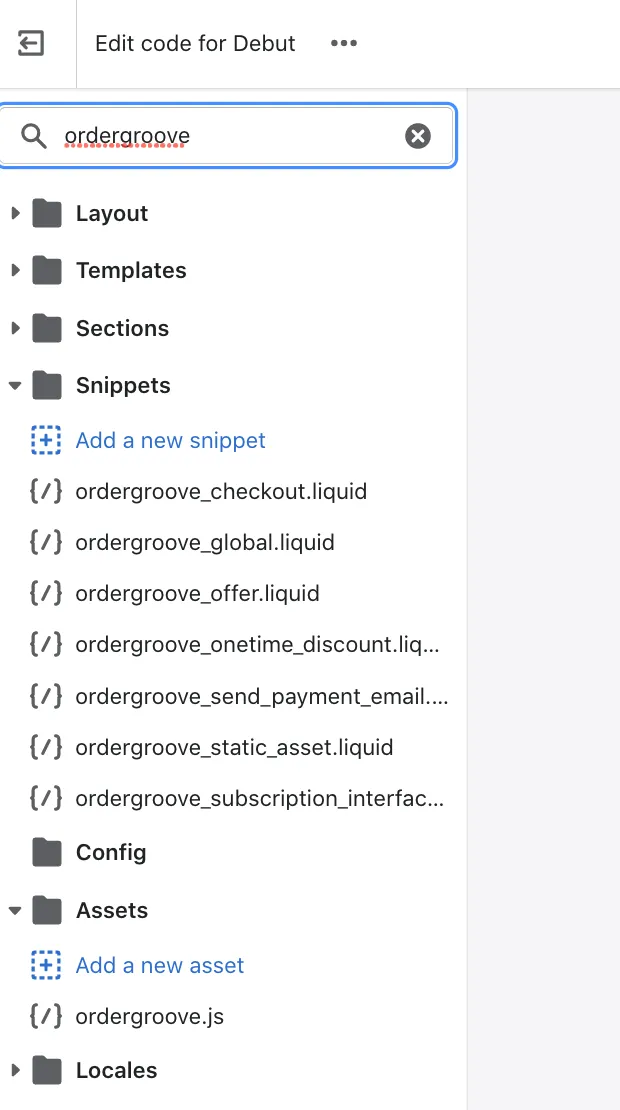
-
Open the
theme.jsfile and search forordergroove. Delete the following snippets if you see them:{%- render 'ordergroove_static_asset' -%}{%- render 'ordergroove_global' -%}
-
Locate the product file that has the Ordergroove snippet (it may be
product.liquid,product-template.liquid, or something else depending on your theme). Search forordergrooveand delete the following snippet if you find it:{%- render 'ordergroove_offer', product: current_variant, location: 'pdp' -%}
-
Open the
customers/account.liquidfile and search forordergroove. Delete the following snippet if you find it:{%- render 'ordergroove_subscription_interface_link' -%}