Subscription Manager Tagging and Authentication
Subscription Page Tagging
The Subscription Manager is where a customer can interact with their subscriptions. In order for this interface to exist, please create a new page under your site’s My Account section to hold the Subscription Manager content. This URL should redirect to the login page if the user is not logged in. Please provide the relative path of this page in the Ordergroove Subscription Settings.
Please note that in the code examples the Subscription Manager is written as MSI which is our legacy name. When writing this code, MSI is the correct method.
Please add the following div to the page
Please add the following JS tag
Front-end Static Domains:
Production: https://static.ordergroove.com
Staging: https://staging.static.ordergroove.com
Use the production domain unless Ordergroove has provisioned your account in Ordergroove’s staging environment — the staging domain 404s without this, and the Subscription Manager won’t load.
Cookie and Signature Creation
When the customer logs into your site, you should create a signature and set it as a “secure” cookie and not HTTP only. Please refer to the HMAC instructions from the Authentication and Encryption article.
- Only set the og_auth cookie if the user is logged in and set it to a 2-hour expiry. Please delete this cookie whenever the user logs out to ensure that access to the customer’s subscription has been terminated when the user’s session ends.
- Do not URL encode this cookie
- The merchant_user_id in the cookie should be the value you use to identify the customer in your system
- Seconds since epoch should not include milliseconds. This will be a 10-digit number
The cookie contents will have the following format:
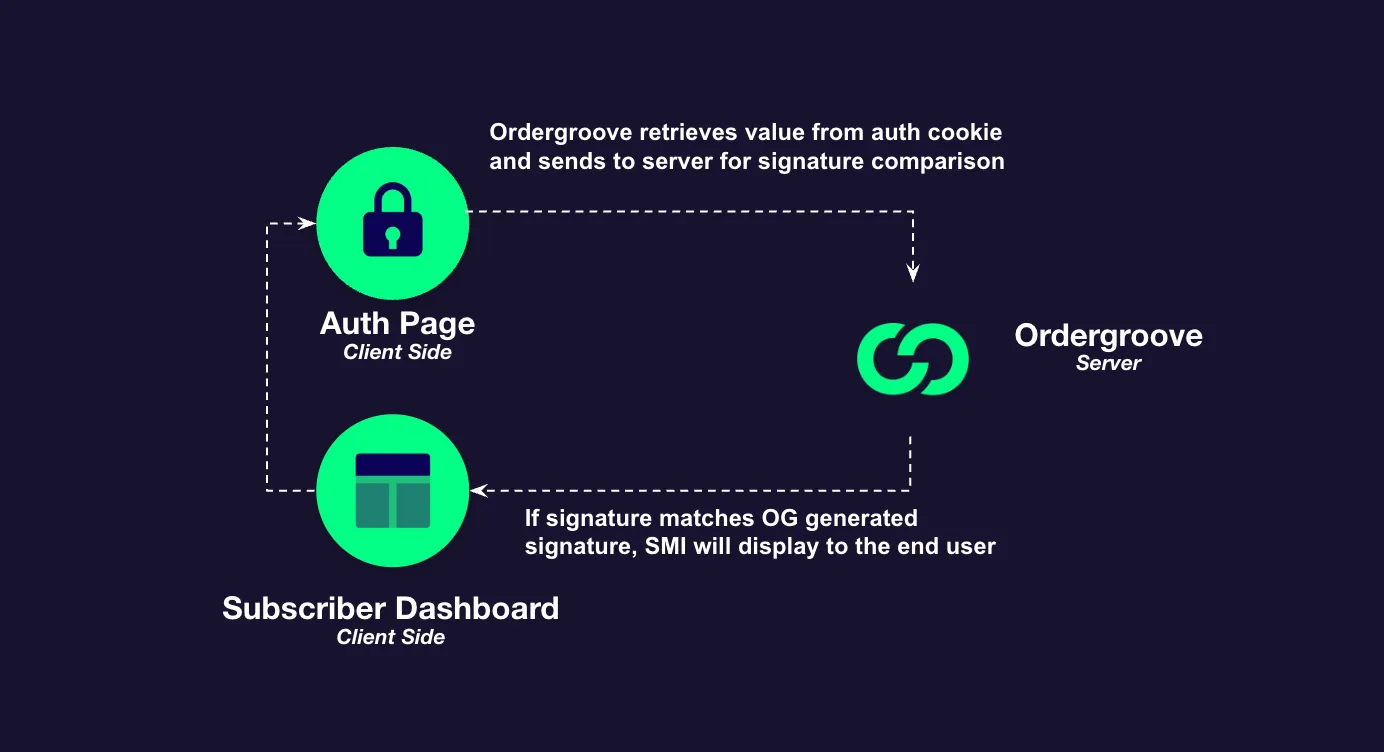
Steps for Ordergroove to load the Subscription Manager
- The browser loads Subscription Manager by visiting the Subscription Manager URL. It must be HTTPS.
- Merchant’s server returns the Subscription Manager page with Ordergroove javascript and if the user is logged in.
- Ordergroove’s javascript, on the Subscription Manager browser page, checks for the
og_authcookie. - The merchant creates a signature with the user_id and timestamp as specified in the Authentication and Encryption article. The merchant sets the signature, the user_id and the timestamp as a “secure” cookie, but not an “HTTP only” cookie. The path of the cookie should be ”/”.
- The Subscription Manager browser page retrieves the signature from the secure cookie and uses it to make API calls
- The Ordergroove server returns the appropriate response if the signature matches and the timestamp is within the last 2 hours.